
Four-eyes output checking in the Aridhia DRE with AIRAlock 3.1
AIRAlock is an app for checking research outputs before they leave an Aridhia DRE workspace. It supports a review process in which two people look at every release, without the files leaving the workspace. It now also reviews trained machine learning models with the evidence from SACRO-ML, and explains in plain language what that evidence means for release. This post describes the process and walks through two example releases: tables and documents from a multi-site oncology study, and a trained model.
Why output checking matters
In a Trusted Research Environment (TRE), researchers can work with sensitive data, but they can only take out results that have been checked for disclosure risk.
Some problems are easy to spot, such as a column of NHS numbers or a contact list saved in the wrong folder. Others are easy to miss because the file looks like normal statistical output. For example:
- a cell of 8 in a table of 2,000 patients;
- a percentage that gives back a suppressed count when multiplied by its denominator;
- two tables that differ by 3 because one excludes trial participants;
- a cost total where one patient accounts for 93% of the sum;
- a model fitted to 14 people;
- a survival table that still shows the 6 people at risk at five years;
- a hidden worksheet that the author has forgotten about;
- a trained model that reveals whether a person was in its training data.
Checking by hand depends on the reviewer having the time to look closely, and the record of what was decided is often brief. Automated checks are consistent, but they cannot take account of things like an agreed analysis plan. AIRAlock uses a rule engine to check every file and show the evidence for each finding, and a person makes the decision. AIRAlock records the engine's result, the decision and the reason together.
How the two reviews work
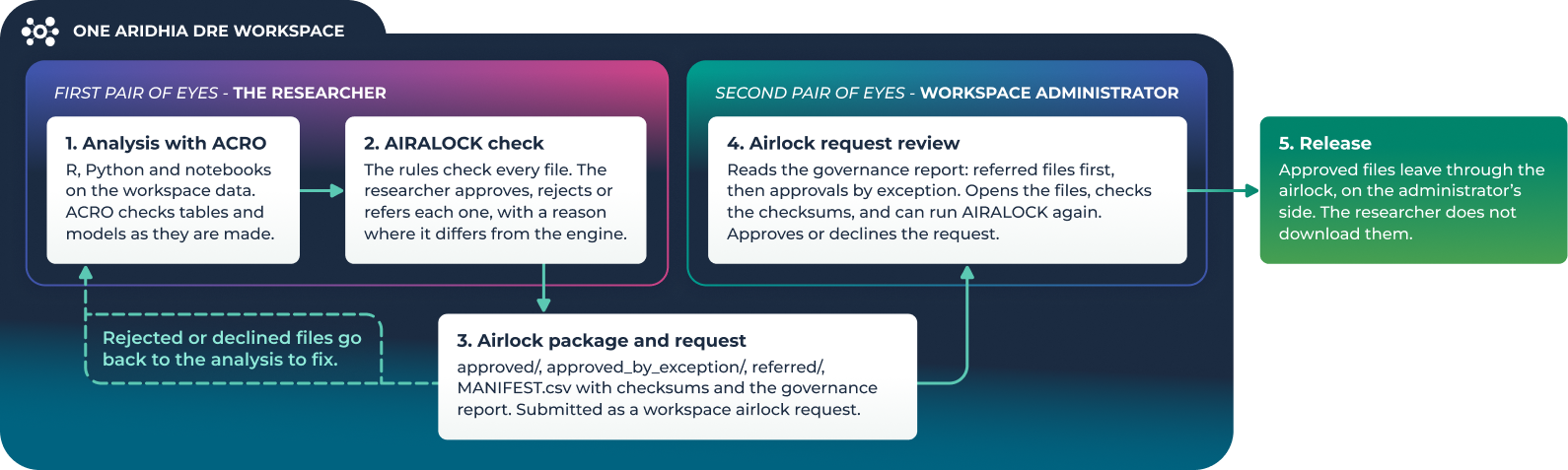
Four-eyes review means that the person who produced an output is not the only person who approves its release. In the Aridhia DRE, both reviews take place in the workspace where the analysis was done. Researchers and data owners do not need to set up a separate review environment or move files between environments.
The first review: the researcher
If the team uses ACRO, it checks tables and models while the analysis runs. When the outputs are ready, the researcher runs AIRAlock on them, fixes what they can and records a decision for each file: approve, reject or refer. If a decision differs from the engine's result, AIRAlock asks for a reason. The researcher can refer any file they are not in a position to decide on. AIRAlock then puts the files into an airlock package with a governance report, and the researcher submits it as a workspace airlock request.
The second review: the workspace administrator
The workspace administrator carries out the second review as part of the airlock request. The governance report lists referred files first, followed by any files approved against the engine's result, with the researcher's reasons. The administrator opens the files, can compare them with the checksums in the report, and can run AIRAlock again if they want to. They then approve or decline the request. Approved files are downloaded from the airlock by the administrator, not from the researcher's workspace.
How decisions are recorded
Any decision that differs from the engine's result is labelled "changes engine result" in the app and needs a written reason. In the package, files approved against a finding go into a separate approved_by_exception/ folder and referred files go into referred/. Rejected files are removed from the batch and are not copied into the package. The audit log is append-only, so if a decision is changed, the new decision is added as a separate entry and the earlier one is kept.
What AIRAlock checks
AIRAlock has 136 rules in 23 families and reads more than 20 file formats. These include CSV, Excel, Stata, SAS, SPSS and Parquet tables, text and Markdown, Word, PDF and HTML documents, JSON and XML, R and Python scripts and notebooks, images, genomic files, DICOM and NIfTI images, archives, and trained machine learning models (pickle, joblib, PyTorch, Keras, ONNX, safetensors, XGBoost and CatBoost files) with their SACRO-ML evidence. Tables are read in full, up to 200,000 rows. The default thresholds are the same as ACRO's: a minimum count of 10, at least 10 residual degrees of freedom, and a dominance rule of n = 2, k = 90%.
| Disclosure risk | What AIRAlock checks | Rules |
|---|---|---|
| Small counts | Count columns in tables, and counts written in text, Markdown, JSON, HTML, PDF, Word and notebook outputs | TAB-005, TXT-002, MD-005, JSON-006, SCR-007 |
| Back-calculation | Percentages and rates that give a small count when multiplied by their denominator | TAB-009 |
| Group (attribute) disclosure | 0% or 100% of a small group sharing an outcome | TAB-027 |
| Dominance | Totals where one or two contributors make up most of the value (n,k and p% rules) | TAB-028 |
| Differencing | Two tables with the same breakdown whose counts differ by less than the threshold | OUT-005 |
| Extreme values | Minimum and maximum values in tables and text | TAB-026, OUT-001 |
| Models and survival | Residual degrees of freedom below the threshold; numbers at risk below the threshold | OUT-002, OUT-003 |
| Re-identification | k-anonymity on individual-level data; quasi-identifier combinations and join keys across files | TAB-015, linkage checks |
| Personal data | NHS, National Insurance, US and EU identifiers validated by checksum; contact details, dates of birth, addresses; identifiers in file names | PII-001 to PII-007, OUT-004 |
| Hidden content | Hidden sheets, rows and columns and cell comments in Excel; comments, tracked changes and hidden text in Word; embedded objects, attachments and form fields | OUT-006 |
| ACRO sessions | Failed or review-required outputs, missing files, checksum mismatches, and sessions run with less strict settings than the TRE's policy | ACR-001 to ACR-007 |
| Trained models | Missing SACRO-ML evidence, models that store their training records, membership and attribute inference, structural risks, attacks the TRE requires but that were not run, training data left in the release, SafeModel results, and model files that run commands when loaded | ML-001 to ML-014 |
| Specialist data | Genomic files, DICOM and NIfTI headers and images, archives, databases and serialised R objects | GEN, DCM, NII, ARC, DAT, SER |
For each finding, AIRAlock shows the rows, lines or values that triggered it, with identifiers masked, and suggests how to fix it. If the workspace is missing a component needed to read a file type, such as the Parquet reader, the governance report says so and those files are marked for manual review.
ACRO and AIRAlock are used at different stages. ACRO checks outputs produced through its own functions during the analysis. AIRAlock checks all the files submitted for release, including the results file from an ACRO session. It also compares the thresholds used in the ACRO session with the TRE's policy, and flags the session if ACRO was run with less strict settings.
Running in the Aridhia DRE
AIRAlock runs inside the workspace. It reads outputs from the workspace file system and writes packages and reports back to it, so files are not sent anywhere else to be checked. The package contains approved, approved-by-exception and referred folders, a MANIFEST.csv file with SHA-256 checksums, and the governance report, which the administrator reads when reviewing the airlock request.
AIRAlock reads ACRO sessions in the same workspace and shows ACRO's results alongside its own. If AIRA is enabled, it uses the workspace's AI service through the workspace API. Thresholds are set for each installation, and any setting that differs from the defaults is shown in the app and printed in the report.
Each TRE also decides whether a person must view every image, model and scanned PDF page. By default these files are Green when no rule finds anything, so they can be approved with the rest of a release. A TRE that wants a person to view each one can require it in the settings, and the administrator guide recommends this for TREs that hold identifiable or special-category data. Files that AIRAlock could not read, for example an image when OCR is not installed, are always marked for a person to check.
Example: a multi-site oncology release
A study team has analysed outcomes for 2,184 patients with HER2-positive early breast cancer treated at six NHS trusts. They want to take 14 files out of the workspace for a steering committee report:
- a baseline table;
- pathological complete response (pCR) by trust and regimen;
- two response tables, one for all patients and one excluding trial participants;
- drug costs by trust;
- overall survival with numbers at risk;
- a Cox model for one trust;
- a results summary in Markdown;
- a supplementary Excel workbook;
- the analysis script;
- an ACRO session with a crosstab and a regression, run by a colleague;
- a patient timeline saved to the outputs folder by mistake.
The data in this example is synthetic. All the screenshots were taken in a single workspace.
Step 1: The researcher runs AIRAlock
The researcher adds the outputs folder to AIRAlock and runs the assessment. Six files are Red, two are Amber and six are Green. The batch overview also reports that the two response tables differ by 3 patients at one trust (OUT-005). Subtracting one table from the other would identify the three trial participants. This check compares tables across the batch, so it would not appear if each file were checked separately.
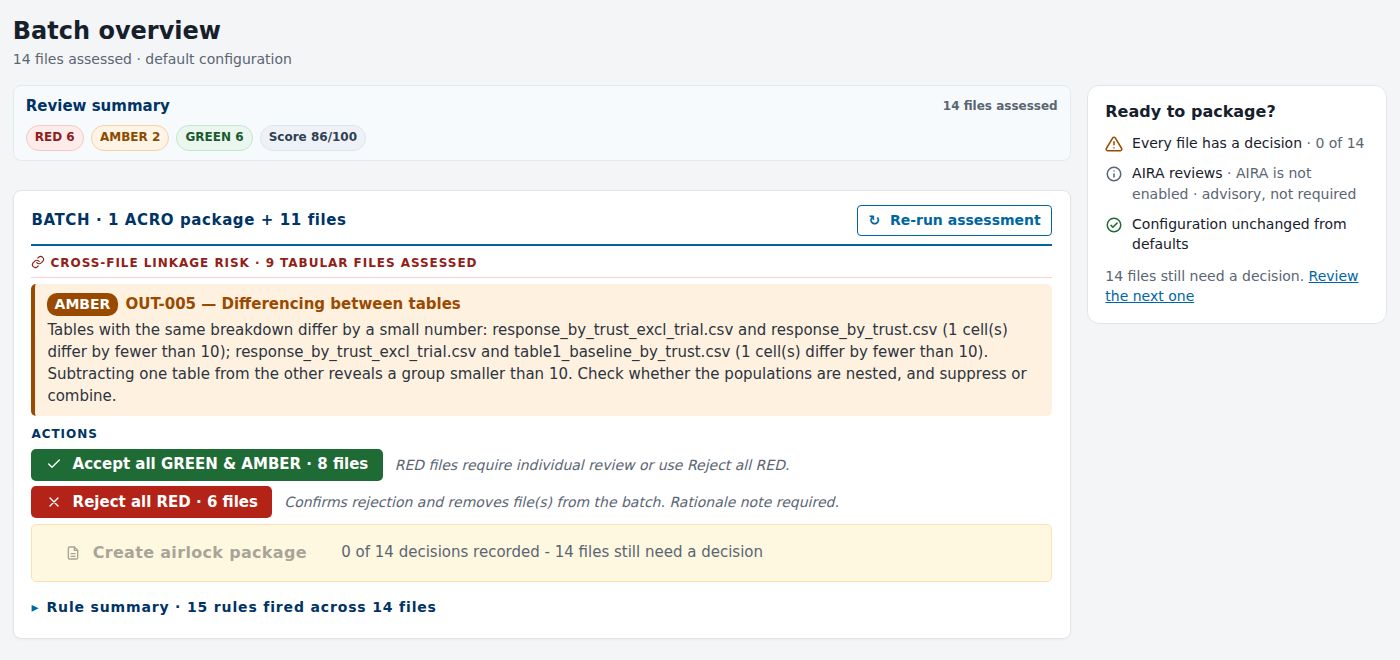
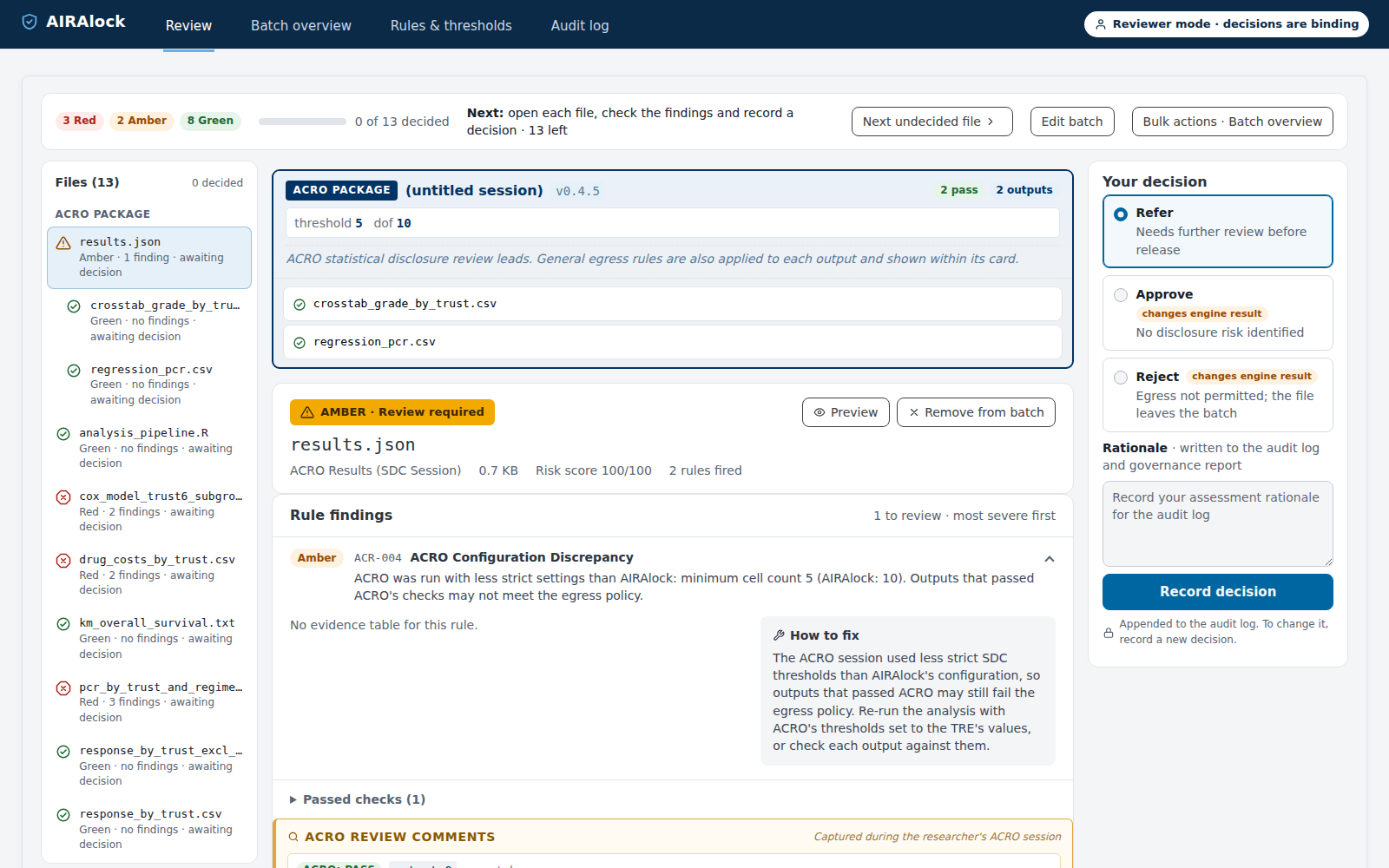
The patient timeline is Red because its file name contains a valid NHS number (OUT-004). The researcher moves it out of the outputs folder. They also stop the survival table at 48 months, where 21 people are still at risk, and change "n = 8" in the summary to "fewer than 10". When they run the check again, there are 13 files: three Red, two Amber and eight Green.
Step 2: The researcher records decisions
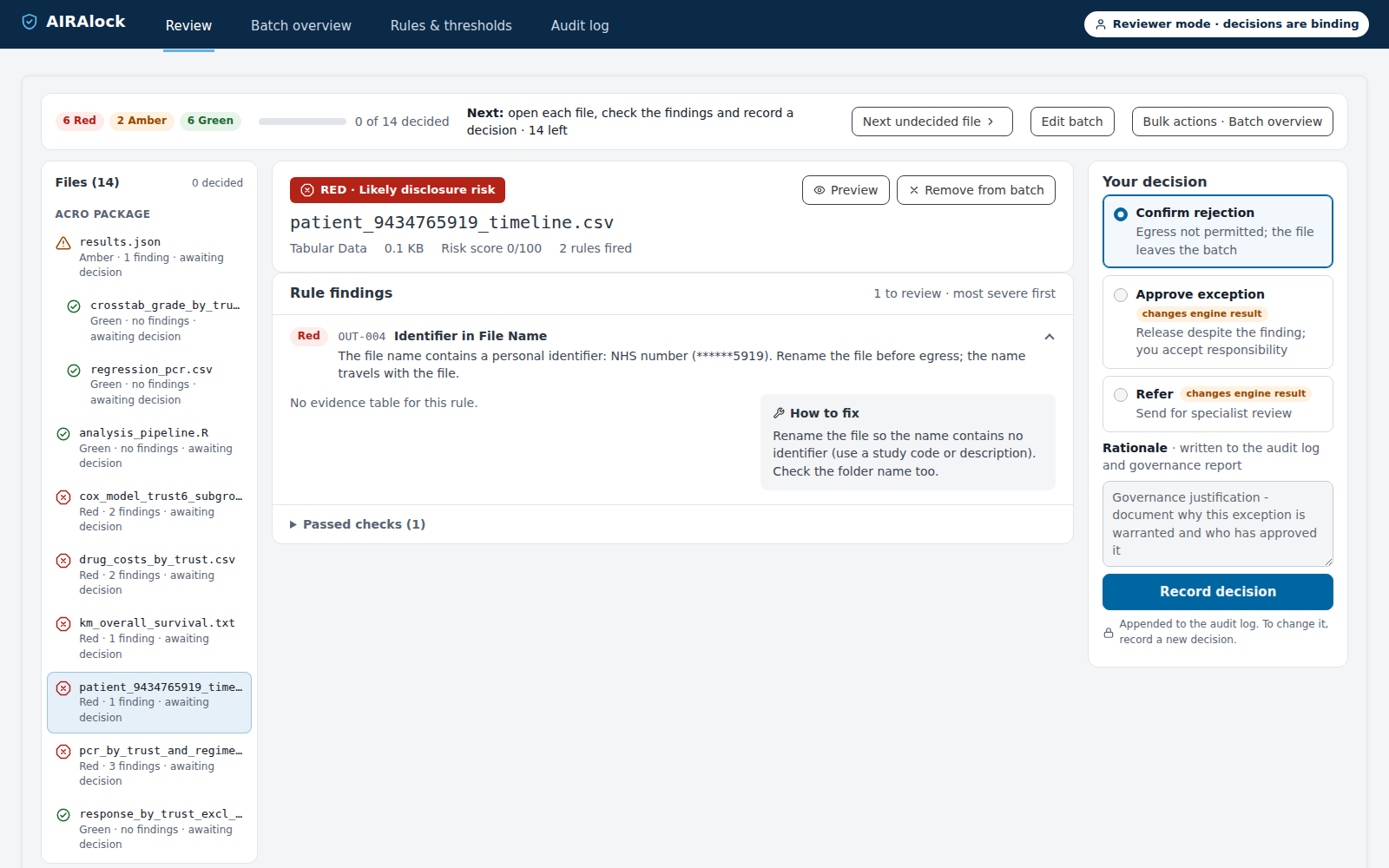
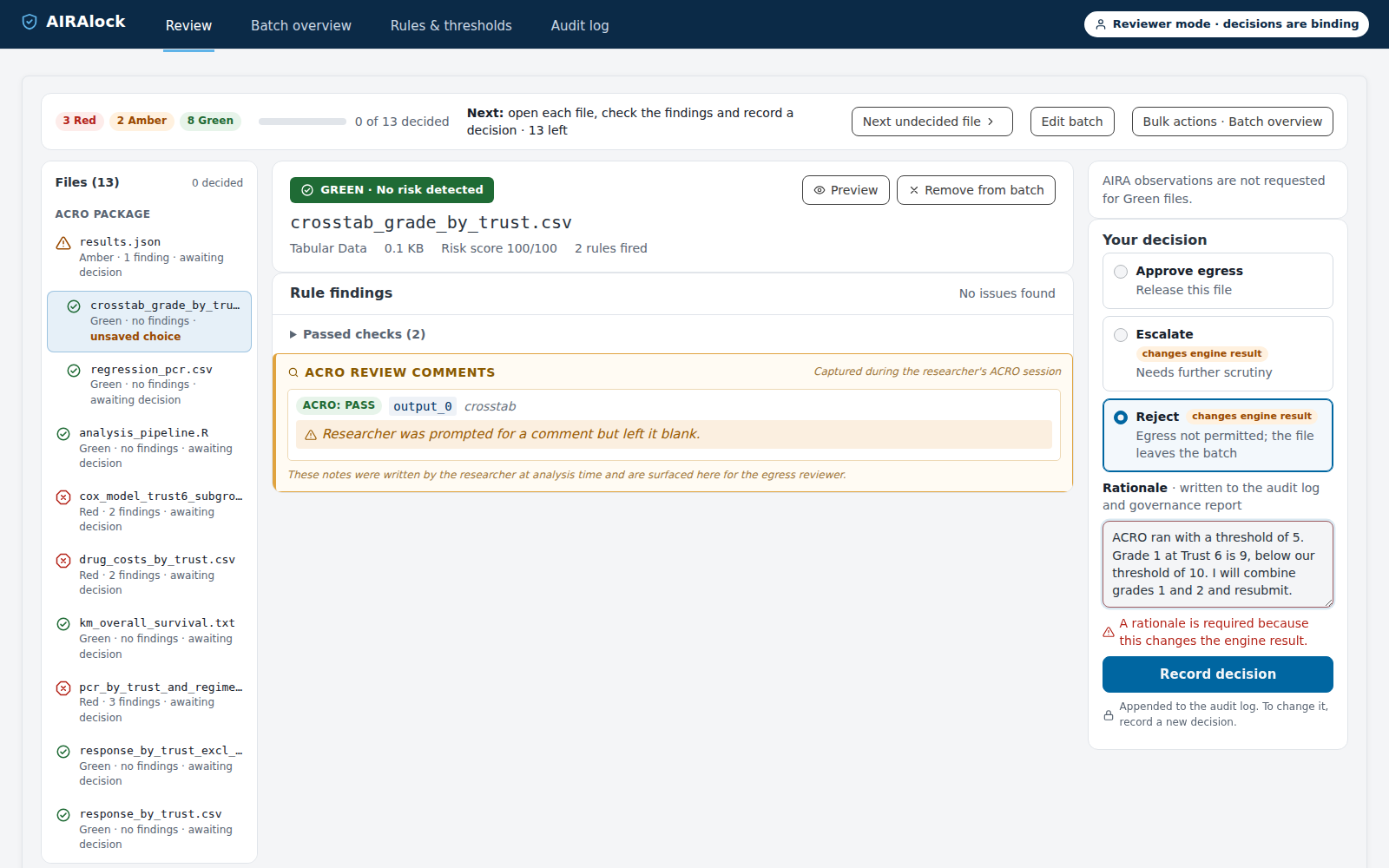
ACRO passed both outputs in the ACRO session, but AIRAlock reports ACR-004 because the session was run with a minimum cell count of 5 and the TRE's policy is 10. The researcher opens the crosstab and finds a cell of 9 for grade 1 at Trust 6. AIRAlock's own count rules did not flag this cell, because the crosstab's column headings are trust names and the rules do not treat those columns as counts. The researcher rejects the crosstab, although the engine marked it Green, and records the reason.
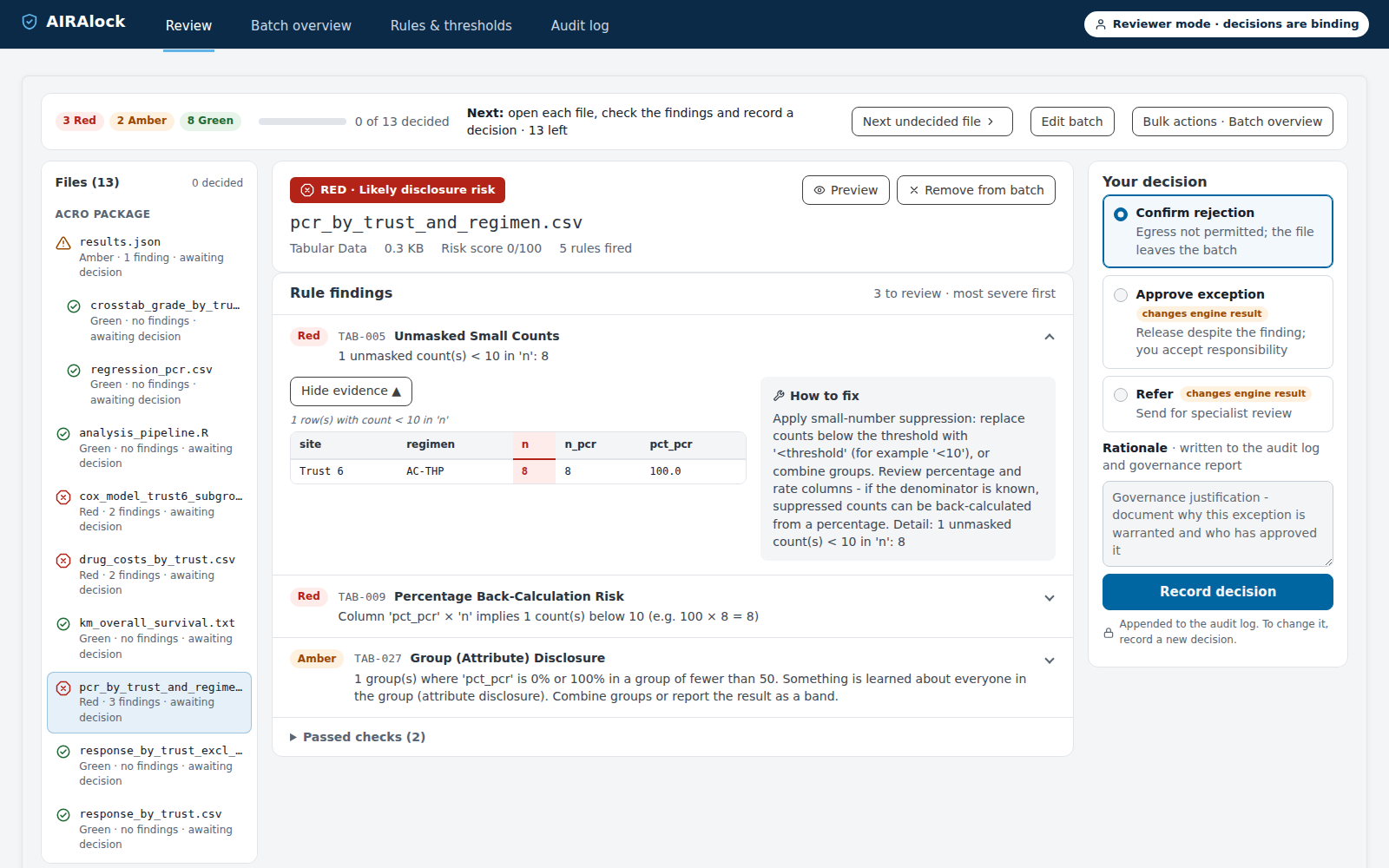
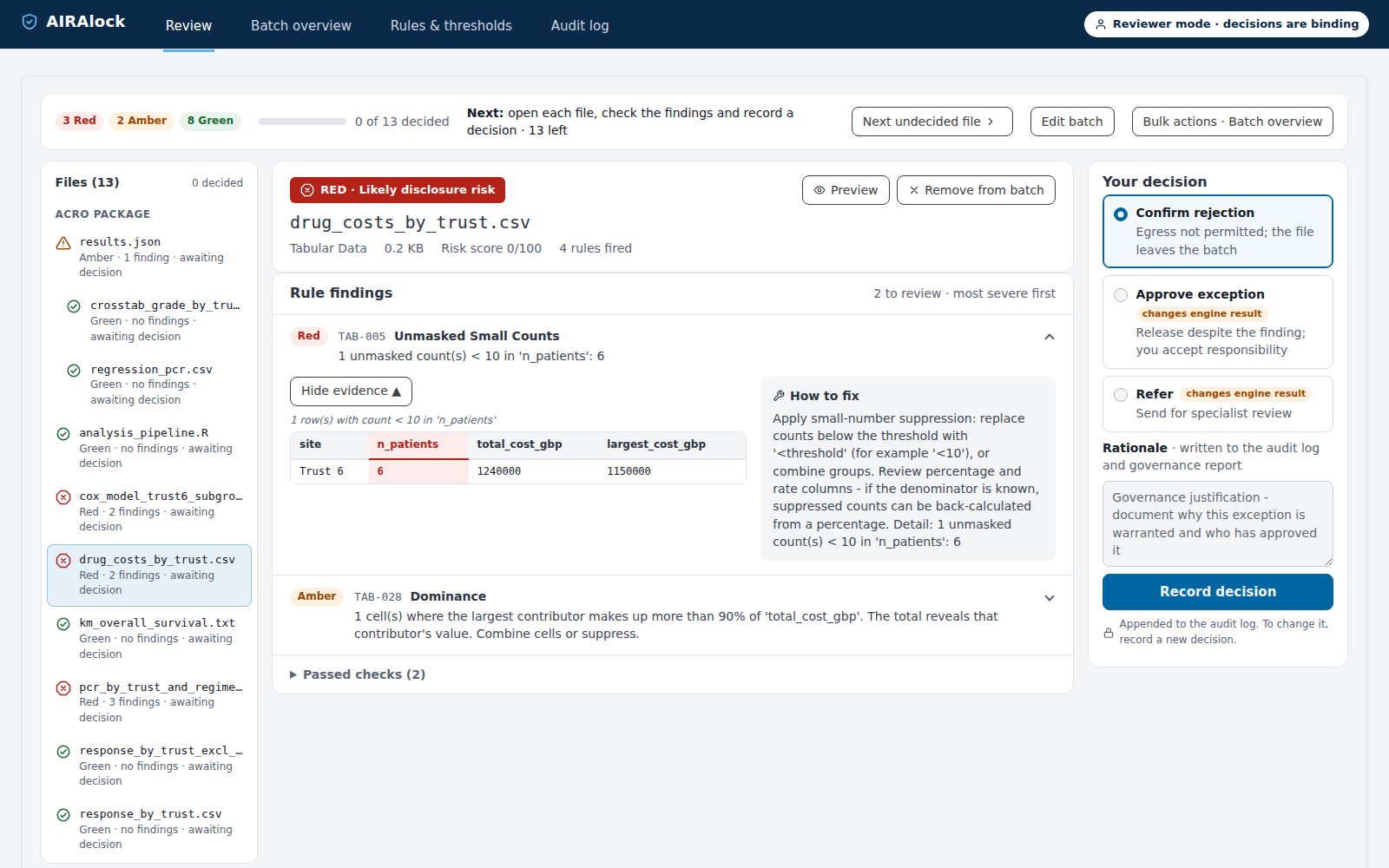
In the pCR table, the row for AC-THP at Trust 6 triggers three rules. It has 8 patients (TAB-005), the percentage and the total give the count back (TAB-009), and all 8 patients had a complete response (TAB-027). In the drug cost table, Trust 6 has 6 patients, and one of them accounts for 93% of the trust's total cost (TAB-028). The researcher rejects both tables and plans to combine groups before resubmitting. They also reject the response table that excludes trial participants, so that only one version is released.
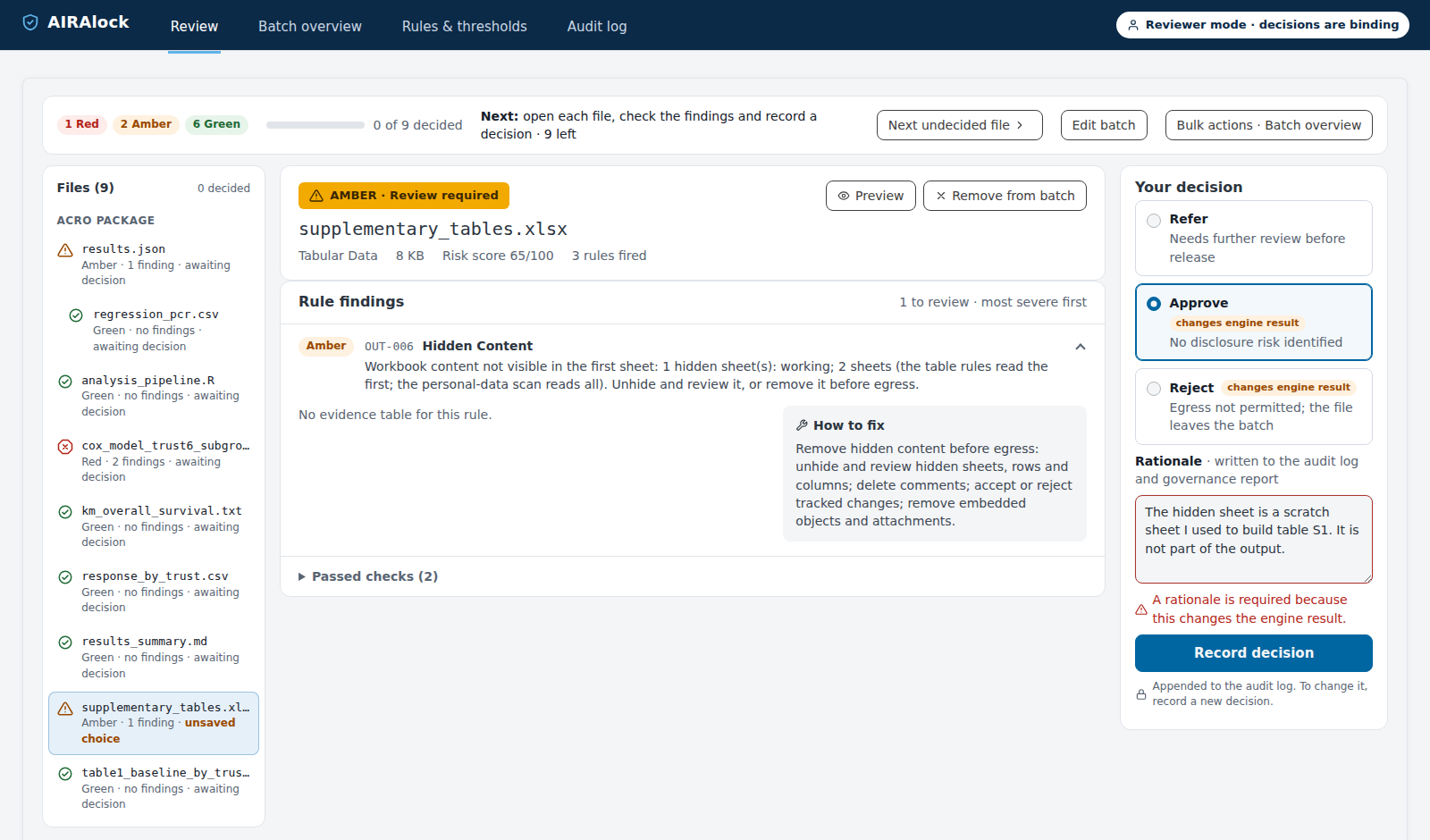
AIRAlock reports a hidden sheet in the supplementary workbook (OUT-006). The researcher believes it is a scratch sheet and approves the file with that reason. Because this goes against the engine's Amber result, the file is placed in approved_by_exception/ and listed in the report for the administrator.
The Cox model for Trust 6 is in the statistical analysis plan, and the steering committee has asked for it. It was fitted to 14 patients with 6 residual degrees of freedom (OUT-002), and the output reports 8 events (TXT-002). The researcher refers it to the workspace administrator with a note.

After these decisions, the four rejected files have been removed from the batch. Nine files remain, and three of their decisions differ from the engine's result.
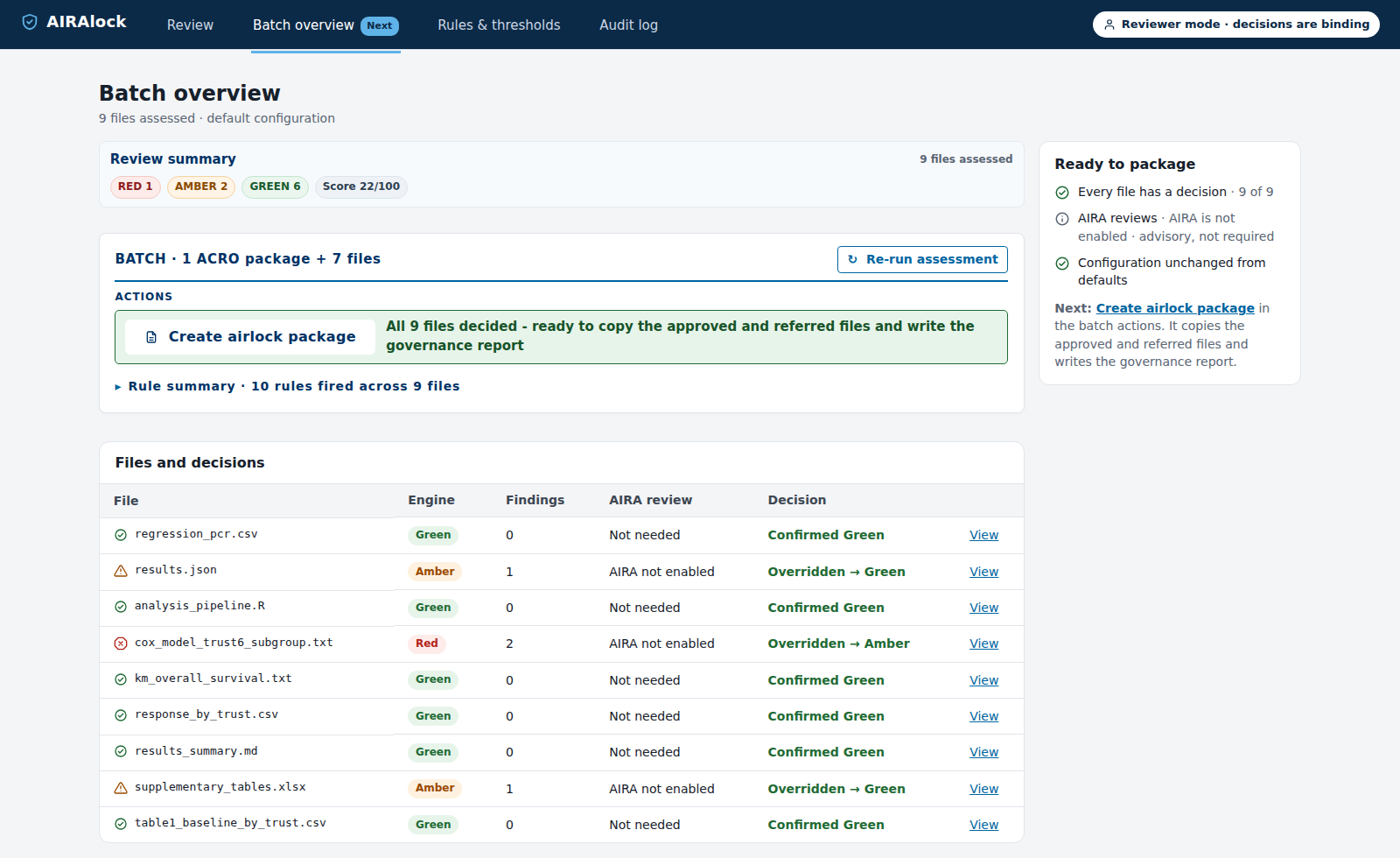
Engine results and decisions for the nine remaining files.
Step 3: The researcher submits the airlock request
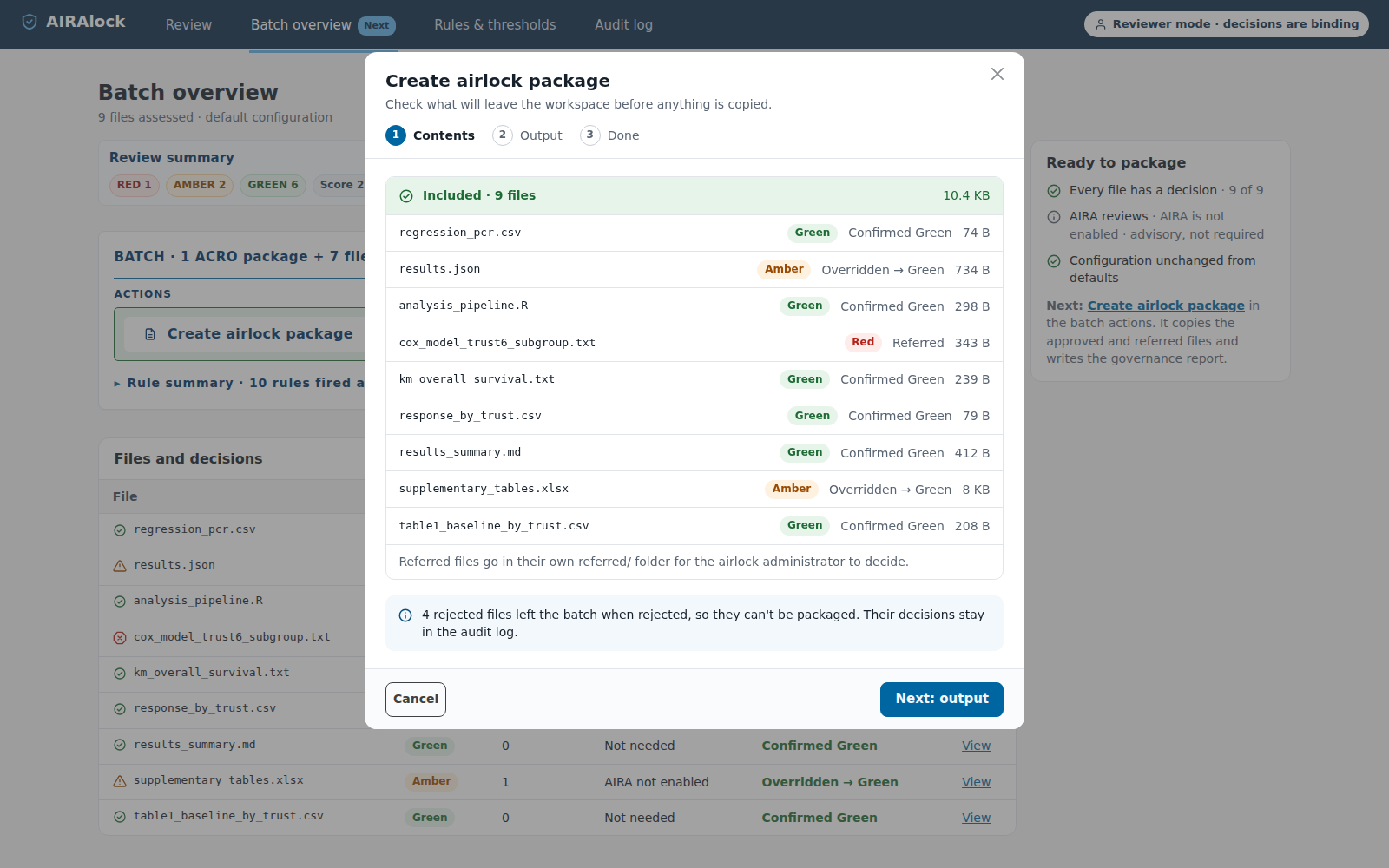
Before copying anything, AIRAlock shows the list of files that will go into the package. Six files go into approved/, the workbook and the ACRO session go into approved_by_exception/, and the Cox model goes into referred/. AIRAlock also writes MANIFEST.csv, which lists each file's status, reason and checksum, and the governance report. The researcher submits the package as a workspace airlock request.

Step 4: The workspace administrator reviews the request
The first page of the report shows the administrator which files need attention: one referred file and two files approved against the engine's result. Each flagged file has its own page with the finding, the evidence, the suggested fix and the researcher's reason. The appendix lists the checksum of every file.
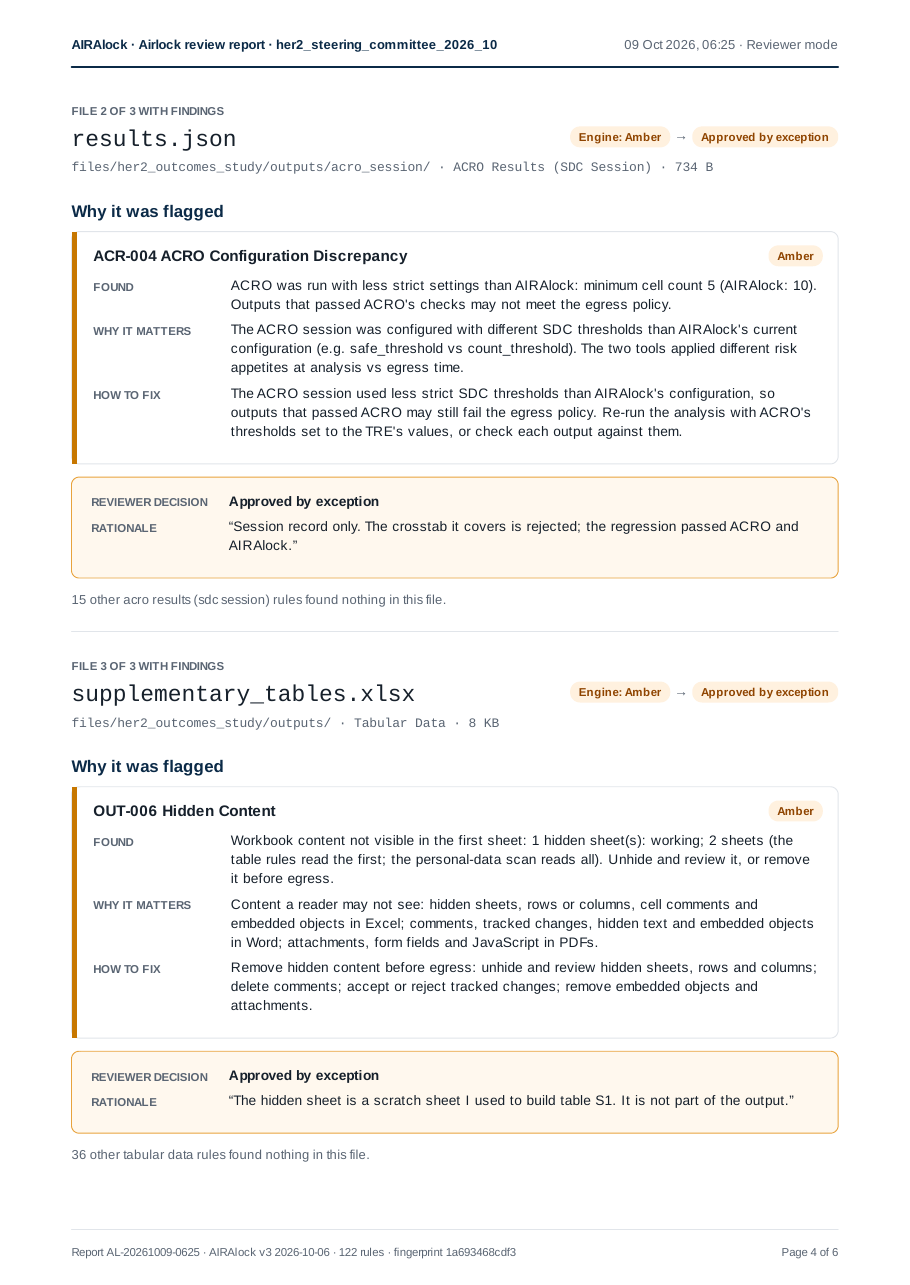
The ACRO session file contains only session details, as the researcher said. When the administrator unhides the "working" sheet in the workbook, they find two rows of patient-level data (regimen, age, stage and response). The researcher had not remembered what the sheet contained. AIRAlock reported that the sheet was there, and the administrator's review found what was in it.
The administrator declines the request and asks the researcher to delete the sheet. They discuss the Cox model with the data owner. They could also run AIRAlock again on the same files, which would give the same findings if the files and settings had not changed. The researcher deletes the sheet and submits a new request, which the administrator approves. The administrator then downloads the files from the airlock.
| File | Engine | Researcher (first review) | Administrator (second review) |
|---|---|---|---|
patient_…_timeline.csv |
Red | Removed before the second check | Not in the request |
km_overall_survival.txt |
Red then Green | Corrected, then approved | Released |
results_summary.md |
Red then Green | Corrected, then approved | Released |
crosstab_grade_by_trust.csv |
Green | Rejected (cell of 9, ACR-004) | Not in the request |
pcr_by_trust_and_regimen.csv |
Red | Rejected, to combine regimens | Not in the request |
drug_costs_by_trust.csv |
Red | Rejected, to combine trusts | Not in the request |
response_by_trust_excl_trial.csv |
Green | Rejected (differencing) | Not in the request |
supplementary_tables.xlsx |
Amber | Approved by exception | Declined because of hidden patient rows; released after the sheet was deleted |
cox_model_trust6_subgroup.txt |
Red | Referred | Decided with the data owner |
acro_session/results.json |
Amber | Approved by exception | Released |
| 5 further files | Green | Approved | Released |
AIRAlock's audit log records each decision with the engine's result at the time, and the DRE airlock records the administrator's approval. If the release is questioned later, the report and the two logs show what was checked, what was decided and why.
Example: releasing a trained model
A trained model is a different kind of output from a table. It can reveal information about the people it was trained on: whether a particular person was in the training data (membership inference), their values for some features (attribute inference), or the training records themselves, for model types that store them, such as k-nearest neighbours. SACRO-ML, the open-source tool from the SACRO project, tests a model for these risks by attacking it. It writes the results to a set of files: target.yaml describes the model, report.json holds the attack results and summary.txt gives a short recommendation.
What AIRAlock adds
SACRO-ML's results are detailed and statistical: for each attack, and often for several repetitions of it, there are AUC values, p-values, true positive rates at low false positive rates and structural flags. A reviewer who is not a machine learning specialist has to work out which numbers matter and what they mean together. Each evidence file also passes AIRAlock's ordinary checks on its own content, and those say nothing about the model: a Green result on report.json means the file contains no personal data, not that the model is safe to release.
AIRAlock reads the evidence for the model as a whole. It:
- checks that the model package is complete, and that the training data, shadow models and per-record files that SACRO-ML leaves in the folder stay in the workspace;
- gives one plain-language reading of the model's re-identification risk (High, Some, Low in the tests run, or Not established), with the reasons and what to do next;
- highlights the values in SACRO-ML's results that decide the reading, explains every value, and says which values cannot be relied on, for example when the test set is too small to measure a result;
- takes its findings from
report.json, the full attack results, and notes wheresummary.txtdoes not match it.
The reading does not replace the rules. Each file is still classified by the rules, every risk the reading names is also a rule finding, and the reviewer decides. AIRAlock reads model files as bytes only and never loads a model, because loading a Python pickle runs code.
Step 1: The researcher checks the model package
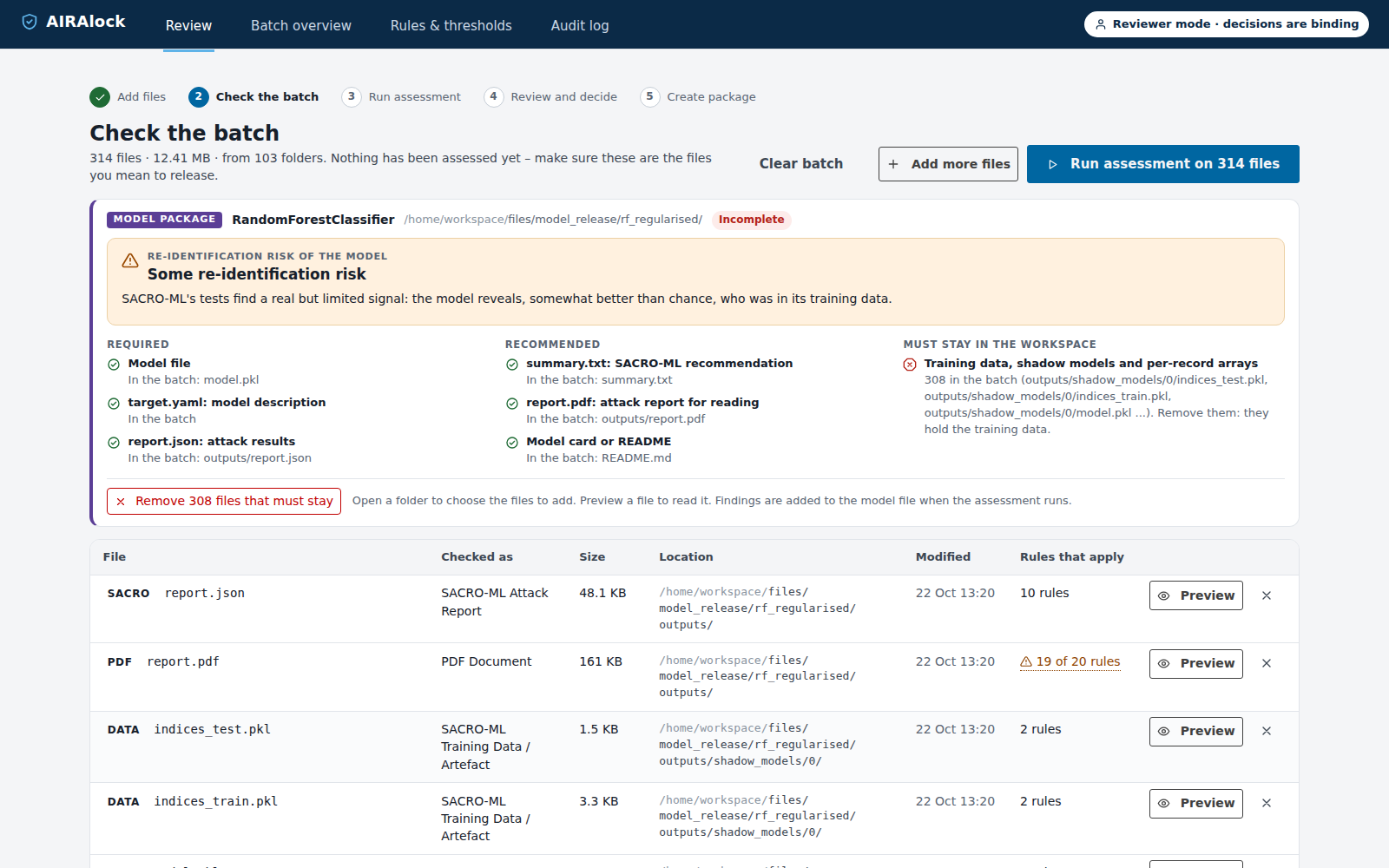
The researcher has trained a random forest on the public Breast Cancer Wisconsin (Diagnostic) data set and run SACRO-ML's structural, worst-case, LiRA, QMIA and attribute attacks. They add the model's folder to AIRAlock, with its subfolders. Before anything is assessed, the batch check shows the model package. The model, target.yaml and report.json are present, and so are the recommended summary.txt, report.pdf and a README. The check also shows that 308 files in the folder hold training data, shadow models and per-record results, which must stay in the workspace. The researcher removes them from the batch. If a required file had been missing, the checklist would link to the folder where AIRAlock found it, and the researcher would choose the file to add.
Step 2: AIRAlock reads the evidence
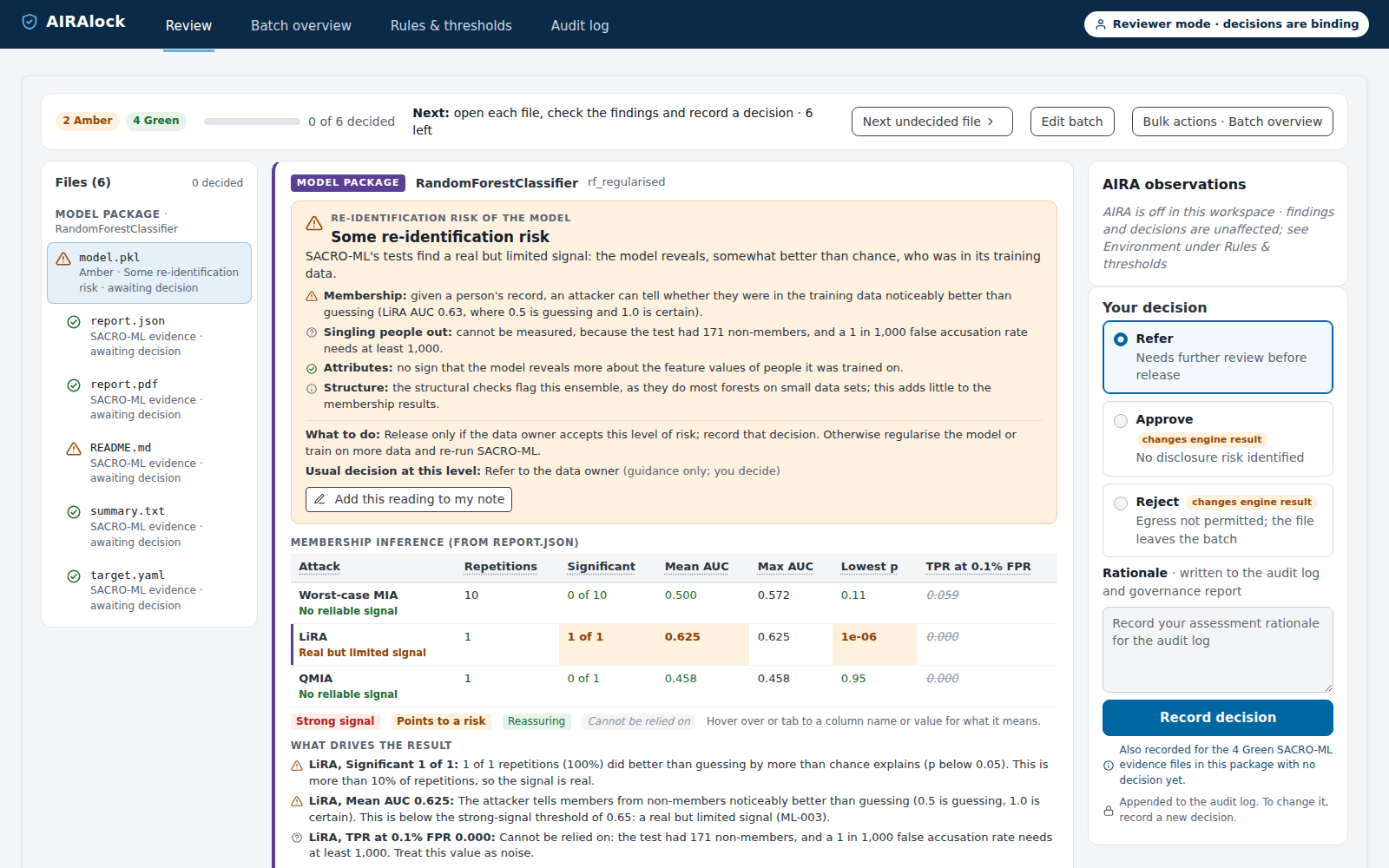
After the assessment, every file in the package opens with the model package card. LiRA, the strongest membership test, found a real but limited signal: the attacker told people in the training data from people outside it with an AUC of 0.63, where 0.5 is guessing and 1.0 is certain. The result is significant, but below the strong-signal threshold of 0.65. The worst-case and QMIA attacks found no reliable signal, and the attribute attack found no sign that the model reveals more about the people it was trained on.
The test set had 171 people outside the training data. Measuring whether an attacker can name individuals with confidence, at a false positive rate of 1 in 1,000, needs at least 1,000. AIRAlock therefore marks that value as one that cannot be relied on, rather than reading the low number as reassuring. Its reading is "Some re-identification risk", and the usual decision at that level is to refer the model to the data owner.
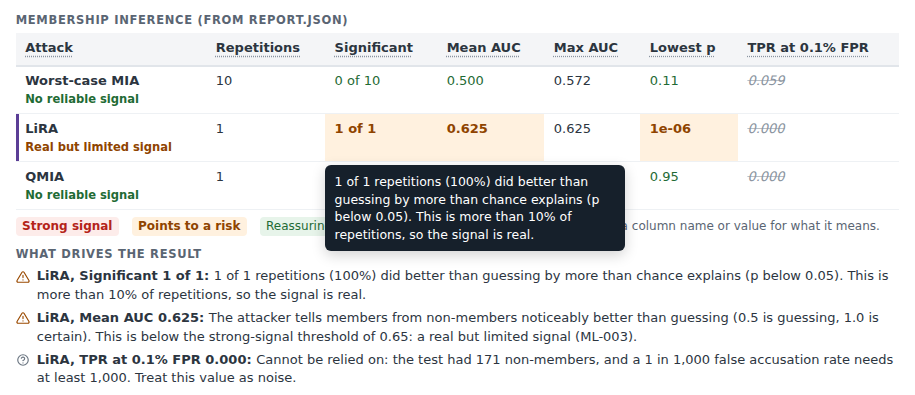
Every column name and value in the membership table has an explanation, shown on hover. The values that decide the reading are highlighted and listed under the table with their explanations, so the reviewer can follow the reasoning without knowing SACRO-ML's output format.
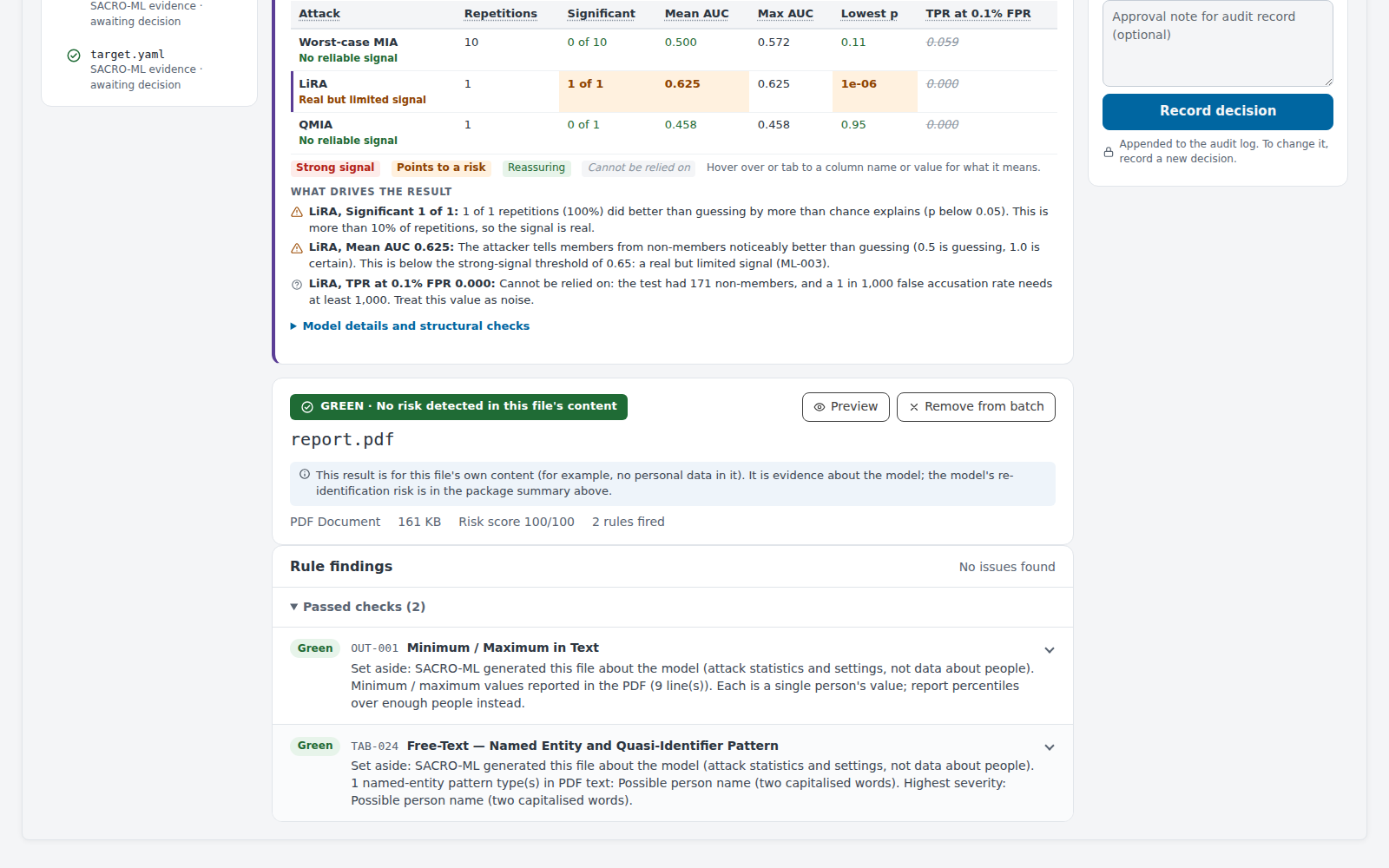
SACRO-ML's own files are judged as evidence about the model. Its report.pdf contains lines such as "AUC mean = 0.55, min = 0.51, max = 0.57", which the rule for minimum and maximum values in text would otherwise read as one person's values. In a model package, findings like these are set aside and stay visible with the reason. Checks for personal data, such as NHS numbers, still apply to these files.
Step 3: The researcher refers the model
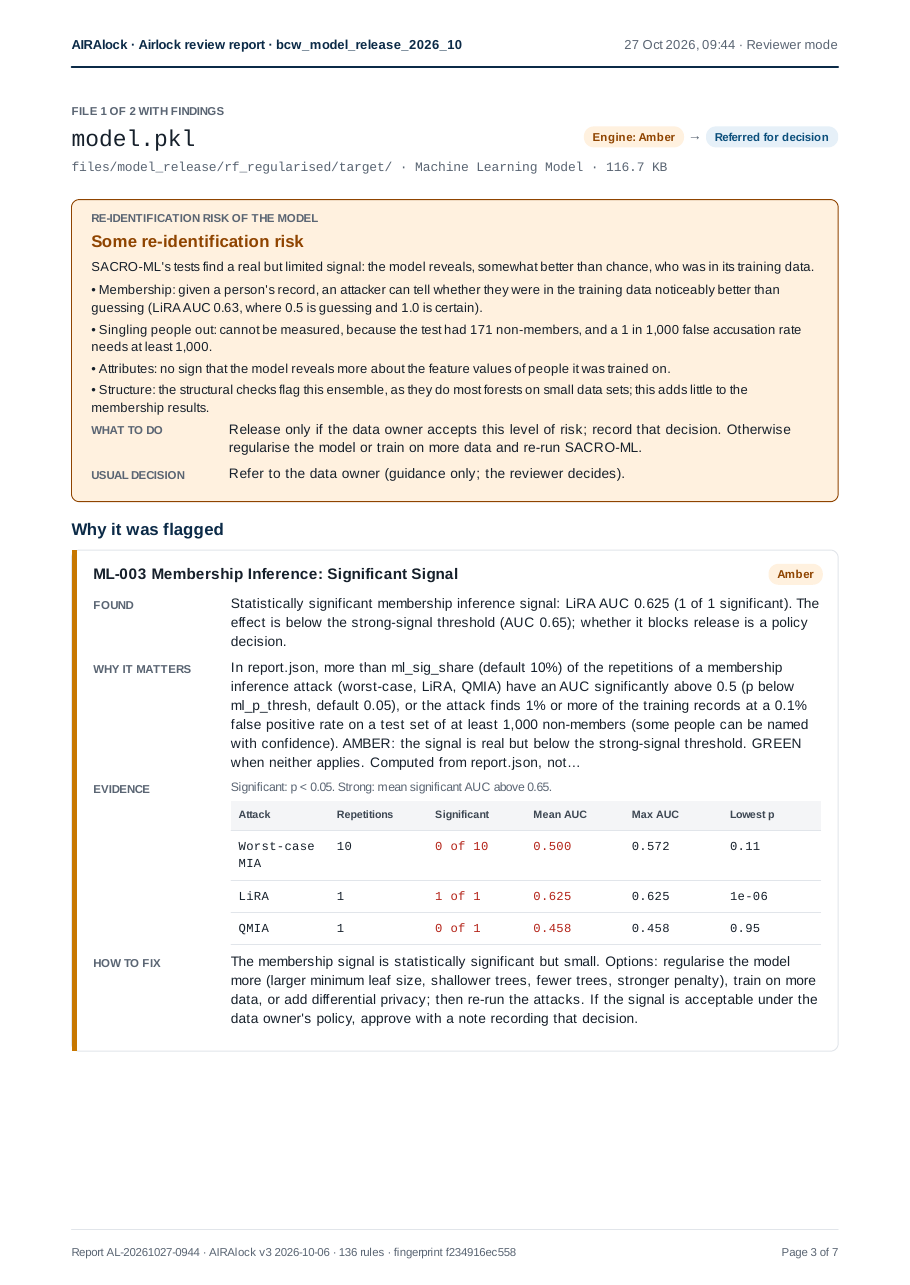
The researcher adds AIRAlock's reading to their note and refers the model. The same decision is recorded for the four Green evidence files, so the model and its evidence travel together in the package. The README's only finding is a possible person name, which turns out to be the name of the data set, so the researcher approves it with that reason. In the governance report, the model's page starts with the same reading, followed by the findings and the evidence, so the workspace administrator and the data owner see what the researcher saw.
Where AIRA is enabled, its review of the model file reads the SACRO-ML evidence and AIRAlock's reading of it. It explains what the evidence means for release, names the values that decide it, points out anything missing or doubtful, and suggests questions to ask the researcher. As for every file, AIRA is advisory: it cannot change a result or record a decision.
What this means for data owners
For data owners, the main benefit is the record. Each released file has the engine's result, the decision, a reason wherever the two differ, and a checksum. Any setting that differs from the TRE's defaults is listed in the report. The rules give the same results for the same files and settings, so the researcher and the administrator see the same findings.
For trained models, data owners get the same record, and a plain-language reading of the SACRO-ML evidence that someone who is not a machine learning specialist can follow and check.
The process also keeps the workload manageable. The researcher deals with most findings before the request is made, and the administrator can concentrate on referred files and exceptions. Both reviews take place in one workspace, so there is no separate environment to set up and no transfer of files between environments.
The screenshots in the oncology example show AIRAlock 3.1.1 in an Aridhia DRE workspace with synthetic data; the trusts, patients and values are invented. The screenshots in the model example show the current version of AIRAlock, with a random forest trained on the public Breast Cancer Wisconsin (Diagnostic) data set and tested with SACRO-ML 2.0.1. AIRA was not enabled. The app header shows "Reviewer mode", which is the mode in which AIRAlock records binding decisions.